Oct 5–7 · Gaylord Texan

ChiAha is at the Food World Summit — Delegate Lounge. Free line assessments this fall.

Apply for an assessment What we are showing →
Reliability-focused discrete rate simulation

From line event data
to defensible
throughput decisions
in minutes, not months.

Most teams piece together separate tools for reliability statistics, simulation and optimization. ReliaSim covers all of it in one package, from a single line to a whole production system. It works from the line event history you already collect, finds the real constraint, and shows what each change is worth before you spend.

Independently validated within 1% of measured OEE by Tom Lange, 36 years in manufacturing R&D
Why simulate first

Simulate before you spend.

Why the loss tree points at the wrong fix, and how a validated model of your line shows what each option actually returns, before capital is committed.

Apply for a free assessment →
A look inside

This is the software.

A full year of the Buffer-Options bottling line runs in 0.3 seconds, and 1,000 of those years take 32 seconds on a laptop.

A time-to-failure distribution (solid blue) and a time-to-repair distribution (dashed red) for one interrupt TTF, uptime TTR, repair Time (min) → PDF
Step 1

Fit your stop history

ReliaStats® groups each machine’s stops by cause and fits a time-to-failure and time-to-repair curve to every one.

Try ReliaStats in the Sandbox →
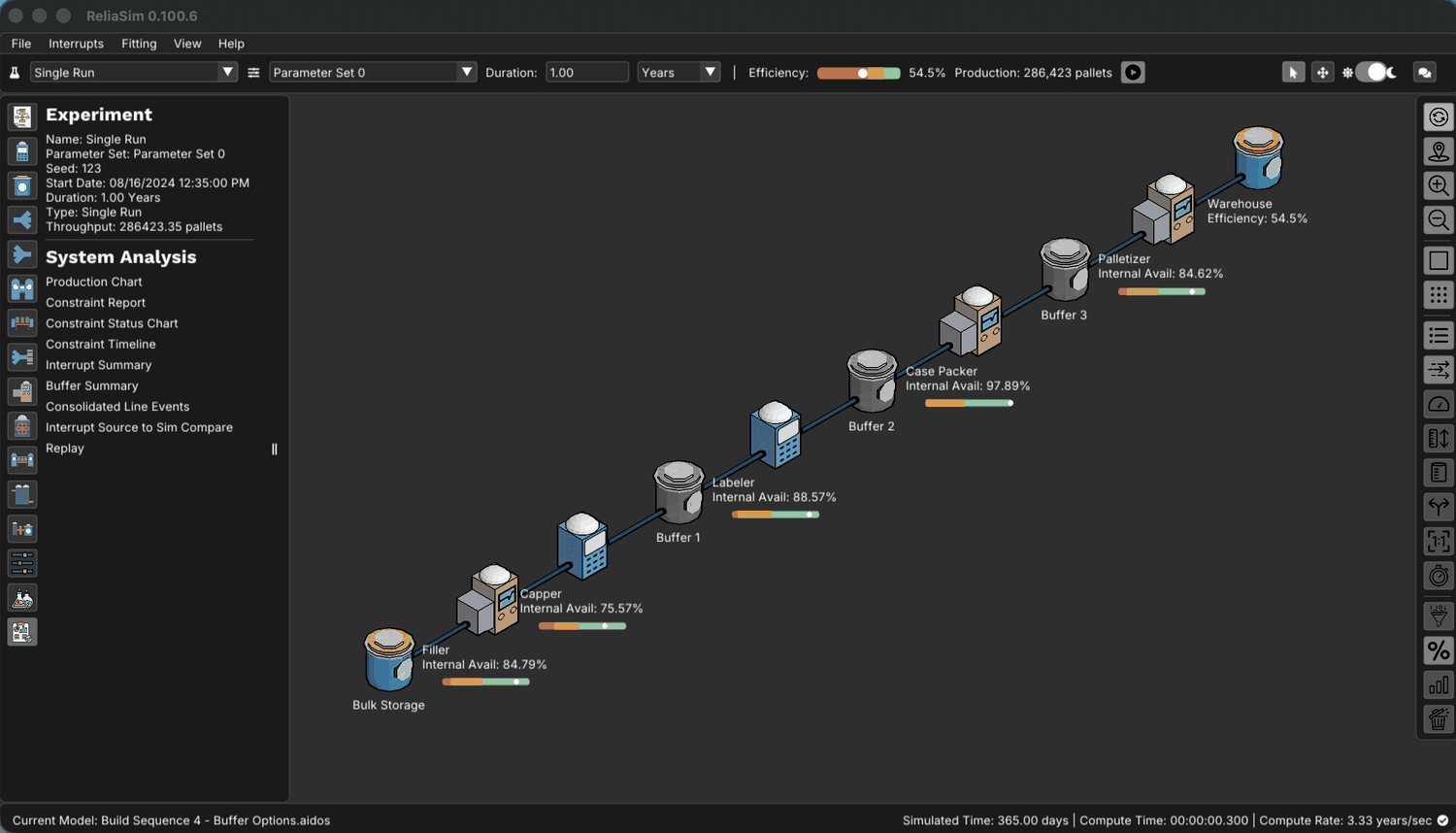
The ReliaSim desktop application after a one-year run of the bottling line, from filler through capper, labeler, case packer and palletizer, with each machine's availability and a 54.5% line efficiency.
Step 2

Model the line

ReliaSim® builds your line from machines, converters and the buffers between them, and every run comes with eight analyses.

Open the Sandbox →
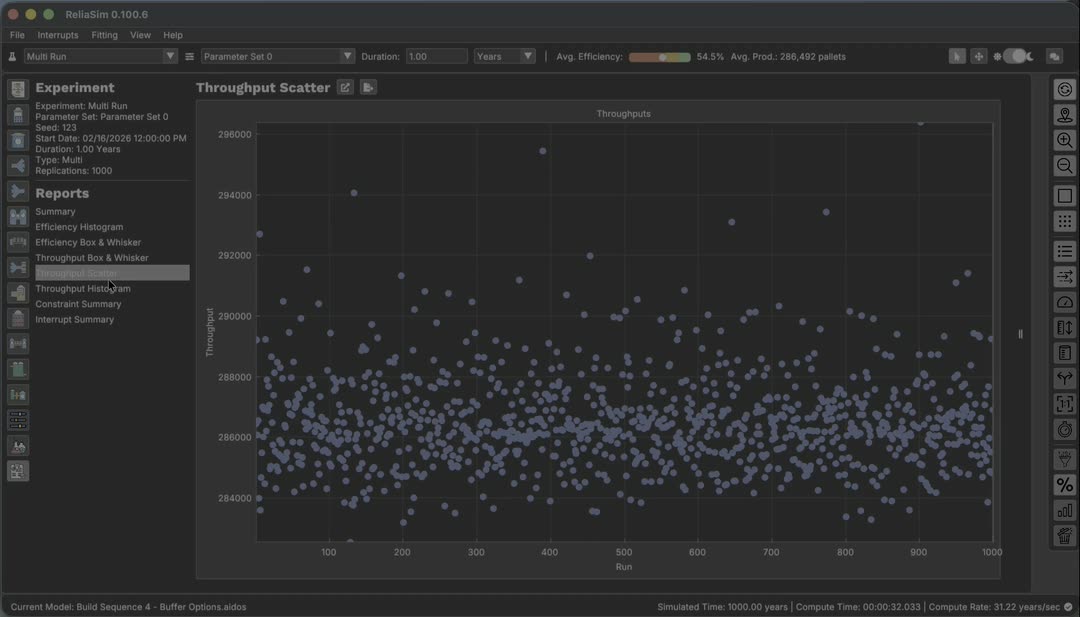
ReliaSim Throughput Scatter for 1,000 one-year runs of the Buffer-Options bottling line, most runs between 284,000 and 290,000 pallets.
Step 3

Test the change

Run each option a thousand times from a fixed seed, so anyone can repeat the answer and see the spread one run hides.

See the method →
Try it

The Sandbox · 8 bottling-line models

The Sandbox is a free browser-based explainer with 8 curated models from the same real bottling line. They're arranged across two tracks (Constraint-Level rollups vs LEDS-Level drill-downs) and four complexity steps. Every number on screen comes from the ReliaSim engine, which ran each model once and saved the results.

Read the model documentation → to see what each model contains, and why all eight predict the same throughput but disagree about the cause.

Open the Sandbox → Plus an AI modeling agent (Claude Sonnet 4.6) that answers from the loaded model’s own engine runs.
The paradox of averages

Two failures, 120 minutes of downtime a week each.
Your Loss Tree ranks them the same.

Consider two failure modes with identical total downtime per week. Your historian treats them the same. Your Loss Tree puts them in the same priority tier. But eliminating them produces completely different results for the line, because cascading losses never appear under the original failure's name.

Scenario 1: Timing Belt
One long stop per week
Frequency1× / week
Repair time~2 hours
120 min downtime / week
Scenario 2: Bottle Jams
One hundred twenty short stops per week
Frequency~120× / week
Repair time~1 minute
120 min downtime / week
Your Loss Tree says: equal downtime = equal priority.
Eliminate either one and the line doesn't respond the same way, because cascading losses are never recorded under the name of the failure that caused them. Most teams pick the wrong one, and it's worth ten minutes to see why.
“Those 120 one-minute interruptions are creating cascading problems throughout your system that don’t show up under the original problem’s name.” Tom Lange, retired Director of Modeling & Simulation, on the 120 one-minute jams

The case study shows what the validated model found on a real bottling line. Micro-stops vs breakdowns explains why short stops behave differently from long ones, and the ranking problem covers which loss to attack first.

See What The Model Found →
How the guided workflow runs

An AI agent runs the method against your validated model

ReliaSim exposes your production model through a Model Context Protocol (MCP) server. Claude and other MCP-compatible assistants can load, inspect, run, and question the model in plain language. You drive the conversation and the model does the math.

Inspect topology & constraints

Node types, buffer positions, interrupt configs and constraint availability, in plain language.

Run simulations on demand

Per-constraint availability, OEE, and multi-run stats instantly.

Buffer analysis through time

Utilization, inflow/outflow, empty/full percentages, and throughput distributions.

Diagrams & reports

Topology visuals and detailed exports, all from one conversation.

Works with Claude, any MCP-compatible AI, and Claude Code.
Bottling Line 90-day run
Online ReliaSim AI · Bottling Line Validated ✓
You
The model is validated at 53.6% OEE. Which machine should I fix first to move that number?
ReliaSim
ReliaSim
The Capper is your critical path. It logged 15,481 downtime events over 90 days, more than triple any other machine, with only 75.44% internal availability. Every Capper outage starves the Labeler, Case Packer, and Palletizer downstream at the same time, so start there.
You
Could adding a buffer before the Capper help without touching the machine itself?
ReliaSim
ReliaSim
Yes. A pre-Capper buffer absorbs Filler surges and prevents starvation during short Capper outages. Estimated gain: +2–3% OEE at low capital cost. But the Capper's 12 active interrupt types still fire at the same rate. The buffer buys resilience, and fixing the Capper's interrupts buys efficiency. Run both scenarios and compare.
Ask about throughput, buffers, interrupts, or what-if scenarios…

Every response comes from your own validated production graph.

Connect your own assistant

/mcp is a live JSON-RPC endpoint. Point Claude, Claude Code, or any MCP-compatible client at it. Setup is in the documentation.

Methodology

The modeling team, built in

Most sim tools hand you a blank canvas. ReliaSim hands you the method we'd run ourselves, the same sequence of checks, builds, and scenarios. AI that knows what good looks like guides you through it end to end.

Step 1: Ingest & Validate

Your data, hygiene-checked before the first model run.

Drop in your line event CSV. The system checks for gaps, time resolution, and fault-code hygiene before you build anything, so bad data gets caught before it becomes a bad model.

Step 2: Build the Validated Model

Guided parameterization against your actual OEE.

You don't need to know which distribution fits which interrupt type, because the method does. A typical build takes 15 minutes.

Step 3: Run the Decisions That Matter

The five scenarios every production system faces.

Fix priority, line speed, buffer sizing, redundancy and resupply, set up as structured scenarios instead of blank-slate guesswork. See the five →

Step 4: Ship a Defensible Recommendation

Your team leaves with a written recommendation.

Every scenario run comes with the topology, the assumptions, and the sensitivity check a capital review needs.

By “the modeling team, built in” we mean the steps an experienced modeler would follow are part of the software, and they run the same way every time.

Get Started

Ready to find your next throughput gain?

You can start three ways. Explore on your own, see it on a real model, or test one question on your own line.

"It runs on my desktop. No integration, no IT project, no waiting. I just install it and start modeling."
— Technology Director, Essity
Free · Start Now

Download ReliaSim Demo

Open and run pre-built models like the bottling line and explore the process hands-on. There's no purchase and no license key. Sign in with your work Microsoft account and the download is free.

Sign in & download the demo
Guided

Live Demo

We walk you through a real production model, then sketch your line and look at your data together, so you can see what a validated model of your system would look like.

Schedule a call
Free this fall

ReliaSim Line Assessment

We model one question about your line on your data and send a two-page readout in about five business days or less.

Apply for an assessment
Industries we've modeled

Food & Beverage Pharma & Life Sciences Aerospace & Defense Energy & Chemical Packaging & CPG Paper & Pulp Semiconductor Academic Research

Stay connected

Join our list

Product updates and new case studies by email. Unsubscribe any time.